

Make your AI coding agent less unpredictable: A showcase
Spoiler: You’ll never make an LLM fully predictable. But you can make it a lot less chaotic.
In this post, I want to share a very simple, very concrete experiment that shows how context engineering and spec-driven workflows can reduce the unpredictability of AI coding agents. Not eliminate it, but reduce it. And that’ll make a big difference with simple efforts.
LLMs are unpredictable, and it’s worse without context
Let’s be honest, many developers today discover AI coding agents through “vibe coding”: short prompts, minimal context, it’s like saying “just generate something that works”.
And to be fair, that’s often how these tools are marketed. But in a professional setting, this approach quickly leads to:
- heterogeneous codebases
- inconsistent architectural choices
- friction during reviews
- frustration toward “AI that does whatever it wants”
Most of the time, agents aren’t wrong. They’re just under-constrained.
To illustrate this, I ran a very basic experiment.
A simple experiment: same prompt, two agents, and no context
The setup
I wrote a prompt in a Markdown file and asked Claude Code and Cursor to execute it independently in 2 different workspaces (NB: I could have used GitHub Copilot or any other agent for this experimentation).
The prompt was intentionally minimal: build a CLI application in Node.js that manages football teams and generates match schedules.
# Goal
* Implement a football match app where we can add football teams create fixtures schedules.
# Features
* Users must be able to add teams identified by their names
* Users must be able to generate a set of fixtures randomly
# Technical topics
* App must be a Node JS CLI with storage on command line
* Code must be tested with unit tests
No planning phase, no explicit conventions, and no architectural guidance. This is not unrealistic: I’ve met many developers still working like this in early Jan. 2026.
The result (without context)
Even before reading the code, the structural drift is obvious. Agents made plenty of arbitrary and implicit decisions.
Claude Code output
- one folder
- tests colocated with implementation
- test framework: node-assert
├── package.json
└── src ├── fixtures.js ├── fixtures.test.js ├── index.js ├── teams.js └── teams.test.js
Cursor output
src/andtests/directories- different naming conventions
- test framework: Jest
├── src
│ ├── cli.js
│ ├── fixtureGenerator.js
│ ├── storage.js
│ └── teamManager.js
└── tests ├── fixtureGenerator.test.js ├── storage.test.js └── teamManager.test.js
Measuring drift
To make this more objective, I used a separate prompt that compares two codebases, highlights differences in architecture, design choices, and technical stack, and outputs a similarity score from 1 to 10 (1 = completely different, 10 = almost identical).
The result? 5 / 10
That’s a lot of divergence for such a small and simple project.
Let’s start context engineering
Context engineering is the practice of organizing the information, constraints, and capabilities provided to AI agents to shape their behavior and outputs.
This first step is very simple: I’ve introduced aCLAUDE.md file (The file supported by Claude Code. Many agents can consume AGENTS.md, GitHub Copilot has its own instructions).
Inside it, I added two sections: architectural conventions (inspired by Domain-Driven Design with clear separation between domain, application, and infrastructure) and testing conventions (ex: use Jest, tests must be assertive with no should and one expect per test).
These rules are not universal truths. They are my preferences. And in a real company, they would reflect team or organization standards.
# Architecture
These guidelines must be followed:
* Organize code by bounded contexts, not technical layers
* Keep domain logic in entities and value objects, not services
* Use ubiquitous language from the domain in code, variables, and method names
* Aggregates enforce invariants; access child entities only through the aggregate root
* Repositories abstract persistence; domain layer has no knowledge of infrastructure
* Domain events communicate between bounded contexts
* Application services orchestrate use cases but contain no business logic
# Testing
Jest is used as testing framework and must be used with the following rules:
* Tests files must ends with ".spec.ts" and be located close to the tested file
* Use assertive, verb-first unit test names instead of starting with 'should'
* Use one expect per test case for better clarity and easier debugging; group related tests in describe blocks with shared setup in beforeEach
* Tests that show a workflow uses multiple describe to nest steps
* Avoid testing that a method is a function; instead invoke the method and assert its observable behavior
* Move 'when' contextual clauses from `it()` into nested `describe('when...')` blocks
* Remove explicit 'Arrange, Act, Assert' comments from tests and structure them so the setup, execution, and verification phases are clear without redundant labels
* Use afterEach to call datasource.destroy() to clean up the test database whenever you initialize it in beforeEach
* Use afterEach(() => jest.clearAllMocks()) instead of beforeEach(() => jest.clearAllMocks()) to clear mocks after each test and prevent inter-test pollution
Re-running the same prompt
With the exact same user prompt, I reran both agents. This time, both Cursor and Claude read the CLAUDE.md file.
What changed?
- similar folder structure (domain / application / infrastructure folders and colocated tests)
- consistent test style that follow my code conventions.
Here is an example of test in the first version:
test('should add a team', () => { const manager = new TeamManager(); const result = manager.addTeam('Arsenal'); assert.strictEqual(result, 'Arsenal'); assert.deepStrictEqual(manager.getTeams(), ['Arsenal']); });
The second version shows that the guidelines in CLAUDE.md have been followed.
it('creates team with valid name', () => { // assertive test name const team = Team.create('Arsenal'); expect(team.name).toBe('Arsenal'); // 1 single expect per test });New similarity score ⇒ 7/10 🎉
CLAUDE.MD is a permanent context. You write it once, and every task benefits.
Going Further: Spec-Driven Development
Permanent context is only half the story. For complex tasks, you also need a temporary, task-specific context. This is where spec-driven / plan-driven development comes in.
Most modern agents (Claude Code, Cursor, GitHub Copilot) now support plan/spec-driven development, where the agent asks clarifying questions upfront and generates a detailed specification before coding. In my experiment, after answering ~10 questions about storage and other details, Claude Code produced a 200+ line plan covering business rules, architecture, and technical choices—all aligned with my CLAUDE.md conventions.
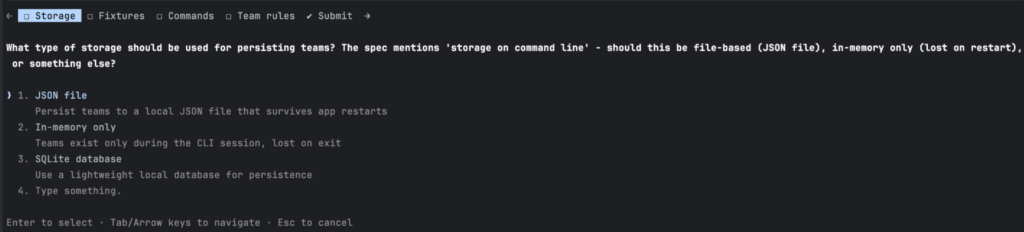
Tip: You should always use the plan mode before starting any task.
I saved this plan as a Markdown file and gave it to both Claude Code and Cursor in separate codebases. The result was improved: architectures converged, boundaries aligned, naming became consistent, and technical decisions matched. While some differences remained—Usage of asynchronous vs. synchronous, naming conventions, dependency version—the structural drift was reduced.
New similarity score ⇒ 8/10 🎉
After another iteration on guidelines alignment, I bet this score could be higher. If I had to do it, I’d prompt Claude Code on the main differences and would update the CLAUDE.md file with new guidelines.
The material used in this project is available on this GitHub repo.
Takeways
With little effort, our similarity score went from 5 to 7 to 8. Imagine if we had been further.
This experiment demonstrates a simple yet powerful truth: without context, AI agents make arbitrary decisions. With even minimal guidance—a shared instruction file and a thoughtful plan—you regain control. You won’t achieve perfect predictability, but you’ll get better consistency, higher quality, and far fewer “why did it do that?” moments.
To bootstrap your first coding standards from your codebase, Packmind will be your ally.