
Writing AI coding agent context files is easy. Keeping them accurate isn’t.
In previous posts, I explored how context reduces coding agent unpredictability. But there’s a problem I didn’t address: maintenance.
AI coding agents like Claude Code, Cursor, and GitHub Copilot all support customization through markdown files—CLAUDE.md, AGENTS.md, .cursorrules, copilot-instructions.md, and more. These files can include coding conventions, architectural guidelines, project structure, commands to run, and domain knowledge. When done well, they dramatically improve agent output quality.
But here’s the catch: the hard part isn’t writing these files. It’s keeping them accurate as the codebase evolves.
The Bootstrapping Illusion
In 2026, with the advent of AI Agents, bootstrapping documentation is trivial. Ask for instance Claude Code to run /init , and you’ll get a CLAUDE.md file few seconds later. The file will describe your tech stack, folder structure, and conventions inferred from your code.
This creates an illusion of completeness. The file exists. It has content. It looks professional. (And I’m ready to bet it does not get a full attention when devs review it).
But three months later? The team may have:
- Adopted a new testing framework
- Restructured the project and moved packages to different folders
- Deprecated two libraries
And CLAUDE.md still says “we use Jest” even though you switched to Vitest.
Dropping code and generating new code is quite cheap in 2026, right?
My point here is: Bootstrapping context is not the challenge. Maintenance is.
What makes a good setup for AI coding agents?
All AI agents support customization through markdown files (CLAUDE.md, AGENTS.md, .cursor/rules, etc.)—their context setup. These files can be nested for modular documentation.
For a monorepo with backend and frontend:
- Root
CLAUDE.md: High-level overview
- Root
backend/CLAUDE.mdandfrontend/CLAUDE.md: Specific details
Files can link to additional documentation that agents read as needed.
For your AI coding agents, a good context setup must:
- Describe the project, core technologies, and structure
- Provide guidelines, conventions, and best practices
- Include feedback commands (tests, build, linting)
- Contain no outdated or contradictory information
NB: in this post, every time I mention CLAUDE.md , these also apply to any AGENTS.md or instructions file for the AI Agent.
Common mistakes in coding agent documentation
I’ve reviewed dozens of AGENTS.md and CLAUDE.md files from real projects. Here are the patterns that most negatively affect agent performance.
Teaser: Later in this post, I’ll show how we began automatically detecting these issues.
1. Vague or Unclear Instructions
This is the most common issue. Instructions written for humans don’t always work for AI agents. I’ve found this instruction:
* Follow the existing 2-space indentation, trailing semicolons, and single quotes only when required.Agents cannot determine which quote style to use in different contexts, leading to inconsistent code generation across strings.
Something like this Quotes: Single quotes for strings and imports; double quotes for JSX attributes could be more accurate.
Also, in an another repo I found this:
## Coding practice
* SOLID, KISS, YAGNI
While an AI Coding agent may understand these terms, I’m not sure about the impact of these instructions.
Also, I’ve found in some cases irrelevant information that may disturb the agent. For instance,
**CRITICAL: Before working on any task in this repository, you MUST read `/Users/abm/software/FRAME/AGENTS.md` in its entirety.**It looks like this will only work on the project owner’s local machine, and I don’t think it is a good idea to make it public.
2. Missing Feedback Loops
Many projects forget to include the commands that let agents validate their own work. For instance:
- How to run tests
- How to lint
- How to build
Without these commands, agents can’t verify that their changes work. They can’t run the test suite after modifying code. They can’t check if their TypeScript compiles. Some smart models can infer commands from codebase, but explicitly specifying them prevents agents from making mistakes and from unnecessarily consuming tokens on every task.
3. Outdated documentation and contradictions
This is the silent killer. The documentation was accurate when written, but the codebase moved on. This is a frequent pattern I’ve found in my research. Here are three basic examples:
- A repo has a
CLAUDE.mdfile mentioning “Node.js requirement: >=18.0.0”, and indeed thepackage.jsonfile mentioned previously states that this version was the minimum required. But currently, it’s 22.0.0 which is required.
- A repo has a
- A repo has undergone a migration from Postgres to MySQL. However,
CLAUDE.mdstill references Postgres, which may lead to confusion.
- A repo has undergone a migration from Postgres to MySQL. However,
- A repo has
CLAUDE.mdfile that describes the project structure and folder hierarchy. However, when I looked at it, there were at least 5 folder paths missing because the project has evolved.
- A repo has
The codebase evolves rapidly—especially as AI agents generate more code than ever. Documentation naturally drifts.
4. Differences between AGENTS.md and CLAUDE.md files
It’s a common practice for projects to maintain both AGENTS.md and CLAUDE.md files. However, these files may tend to diverge over time. In a repo I’ve found these 2 files have 178 different lines based a basic diff output.
As a consequence, developers will not have the same experience with their AI agents, depending on the tool they use. Moreover, some tools, such as Cursor, can read both AGENTS.md and CLAUDE.md. Developers should maintain both carefully.
Detecting context gaps
Beyond fixing existing mistakes, there’s another question: what’s missing entirely?
A context gap occurs when your codebase uses a technology, pattern, or convention that lacks corresponding documentation for agents.
Some patterns I look for:
- React codebase with no React guidelines: If 60% of your code is React components, but your CLAUDE.md only talks about backend conventions, that’s a gap.
- No testing instructions in a tested codebase: If you have hundreds of test files but no guidance on how to write them, agents will guess.
- Multiple languages with single-language docs: A TypeScript frontend + Python backend with only Python guidelines..
Detecting these gaps requires analyzing your codebase and comparing it against your documentation.
Introducing Context-Evaluator
How do you actually find these issues at scale? You can’t manually audit every file in a 50-repo organization.
So at Packmind, we’ve built an open-source tool called context-evaluator. It analyzes local or remote Git repositories and identifies issues and improvements in your AI coding agent documentation setup.
The tool reads content from Claude Code, GitHub Copilot, and AGENTS.md files, including rules and skills. It runs your agent CLI tool (currently supported: Claude Code, Cursor, GH Copilot, OpenCode, and Codex) using prompts tailored to detect issues or suggest improvements.
You can set it up locally or use the public web page (only public repos can be scanned; for private repos, install Context-Evaluator locally). It’s still experimental, so we’d be happy to have your feedback on how it performed on your projects.
Besides, all these examples from this blog post were identified using Context-Evaluator.
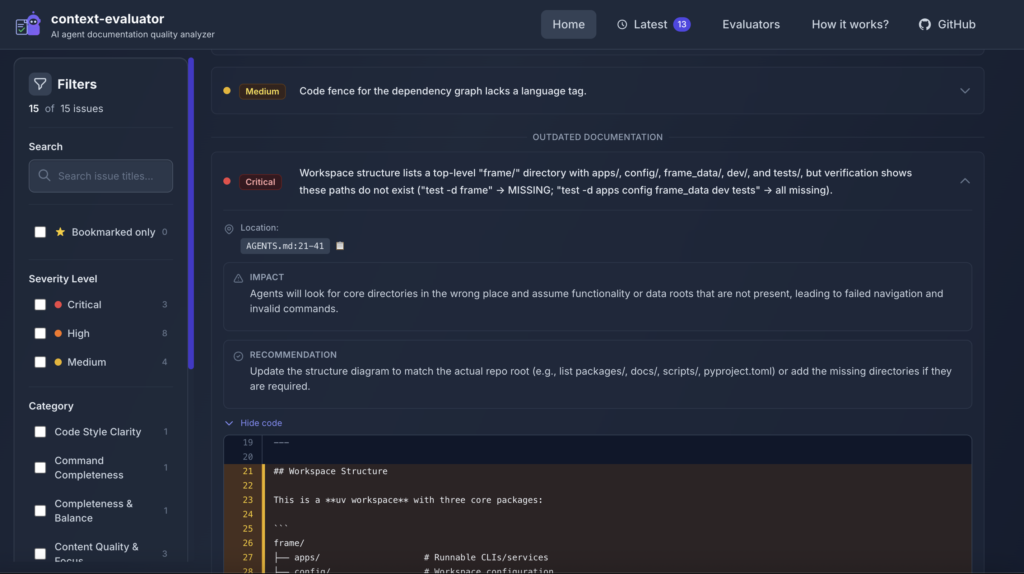
Overview of Context-Evaluator, in early Feb 2026
Beyond Detection: Automated Remediation
- Rewrite vague rules into actionable guidance
- Suggest missing feedback commands
- Normalize duplicated conventions
- Highlight outdated technology references
- Propose modular restructuring of large files
From Files to Managed Playbooks
- Convert instructions into explicit, versioned standards
- Distribute consistently across agents and repositories
- Track drift and govern ownership at scale
Conclusion
The patterns described here—vagueness, missing feedback loops, contradictions, and drift—are common. They don’t break your system. They quietly degrade agent performance.
My recommendations:
- Audit your files as if you were an AI agent: Read your CLAUDE.md or AGENTS.md and ensure every instruction is executable and actionable.
- Add validation commands: Ensure agents can run tests, linting, and builds to validate their work.
- Detect contradictions and gaps: Compare your documentation coverage to your actual codebase. Packmind can help you create coding standards based on your current context.
- Make maintenance a habit: Review context files during architectural changes, not just when onboarding. Use the context-evaluator regularly to identify areas for improvement.
- Centralize and version critical standards: Move beyond repo-scoped files to managed, versioned playbooks that can be distributed consistently.
The goal isn’t perfect documentation. It’s documentation that stays aligned as your code evolves.
An AI agent is only as smart as the last time your context was reviewed.